·
28 min read
Detailed: Auto-archive every Claude Code session into an `ai_sessions` folder
Detailed: Auto-archive every Claude Code session into an `ai_sessions` folder
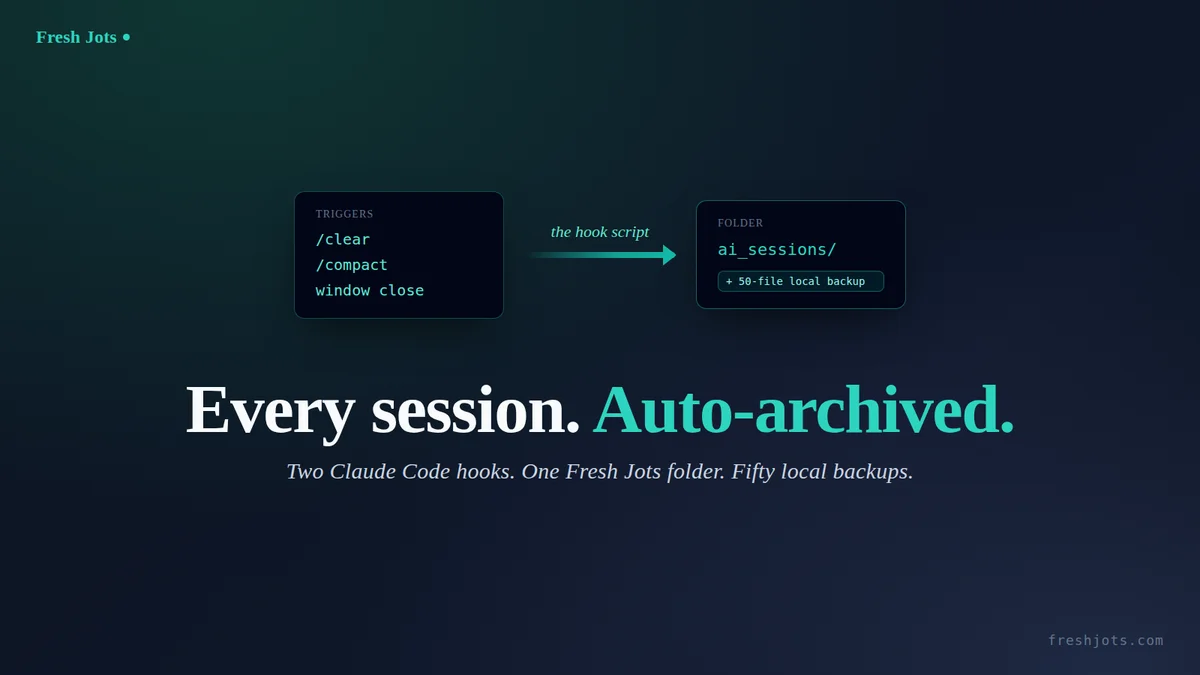
For readers who own a Fresh Jots API token, and it's set and who want a clean session-archive pattern: every /clear, every /compact, every window close lands as a new note inside a dedicated ai_sessions folder, titled claude-code-YYYY-MM-DD-session-HH-MM-SS, with a 500-file rolling local stash as a fallback.
Four design choices worth knowing up front:
- `FRESHJOTS_TOKEN` is read from the environment — exported once in your shell profile, never written into the repo or echoed back by the script.
- `claude-code-YYYY-MM-DD-session-HH-MM-SS` titling — date plus a wall-clock timestamp, so notes sort naturally in the Fresh Jots UI, the day is obvious at a glance, and every title is unique per second (no counter, no API round-trip to pick a number).
- A single `ai_sessions` folder for every note. Fresh Jots seeds this folder for every new account at signup, so on a fresh account the script's first run finds it without needing to create one. If you ever rename or delete the folder from the UI, the script's create-fallback re-makes it on the next session and the cached id self-heals.
- A 500-file rolling local stash — the most recent fifty sessions stay on disk; older ones are pruned automatically.
Prefer not to wire this up by hand? There is a much simpler route — the one-prompt setup, which pastes a single block into Claude Code and archives your sessions for you. The same idea also lets you connect any other AI coding agent to Fresh Jots, detailed in One prompt: paste this into Claude Code and your sessions auto-archive to Fresh Jots. You can Connect any AI coding agent to Fresh Jots.
1. How the trigger works
1. How the trigger works
Claude Code emits hook events at well-defined moments. Two of them cover all three triggers we care about:
- `SessionEnd` fires when the session ends. The matcher filters on the end *reason*, so one entry covers `/clear` (`reason=clear`), an explicit logout (`reason=logout`), `Ctrl-D` at the prompt (`reason=prompt_input_exit`), and a normal window/terminal close (`reason=other`).
- `PreCompact` fires immediately before a context compaction — i.e. when you type `/compact`, or when Claude Code auto-compacts as the context window fills.
Two hook entries in `~/.claude/settings.json`, one script behind both. Same script handles every case — the title is just `date +%Y-%m-%d` plus `date +%H-%M-%S`, which doesn't care which event called it.
2. The hook script
2. The hook script
Save this as `~/.claude/hooks/freshjots-claude-sessions.sh`. Walk-through below.
```bash
#!/usr/bin/env bash
# Auto-archive each Claude Code session as a new Fresh Jots note inside
# the ai_sessions folder, with a rolling 500-file local stash as a
# fallback for offline / API-down moments.
# Wired in ~/.claude/settings.json for PreCompact + SessionEnd events.
# Always exits 0 — failures log, never block the user.
set -uo pipefail
STASH_DIR="$HOME/.claude/freshjots-stash"
LOG_FILE="$STASH_DIR/.log"
FOLDER_ID_FILE="$STASH_DIR/.folder-id"
FOLDER_NAME="ai_sessions"
KEEP=500
mkdir -p "$STASH_DIR"
log() { printf '[%s] %s\n' "$(date -Iseconds)" "$*" >> "$LOG_FILE"; }
INPUT=$(cat)
SESSION_ID=$(printf '%s' "$INPUT" | jq -r '.session_id // empty')
EVENT=$(printf '%s' "$INPUT" | jq -r '.hook_event_name // empty')
log "FIRED event='$EVENT' session='$SESSION_ID'"
[ -z "$SESSION_ID" ] && { log "ABORT: no session_id"; exit 0; }
[ -z "${FRESHJOTS_TOKEN:-}" ] && { log "ABORT: FRESHJOTS_TOKEN not set"; exit 0; }
# Locate the JSONL Claude Code is writing for this session.
TRANSCRIPT_JSONL=$(find "$HOME/.claude/projects" -maxdepth 2 \
-name "${SESSION_ID}.jsonl" -type f 2>/dev/null | head -1)
if [ -z "$TRANSCRIPT_JSONL" ] || [ ! -s "$TRANSCRIPT_JSONL" ]; then
log "ABORT: could not locate JSONL for session_id=$SESSION_ID"
exit 0
fi
# Title: date + HH-MM-SS — sortable per day and collision-free. (A per-day
# count would stick once the 500-file rotation caps the file count, so
# every later session that day would reuse the same number and overwrite;
# a wall-clock timestamp avoids that failure mode.)
TITLE="claude-code-$(date +%Y-%m-%d)-session-$(date +%H-%M-%S)"
STASH_PATH="$STASH_DIR/${TITLE}.txt"
# Flatten JSONL → role-prefixed plain text. The block() helper normalises
# content items: Claude Code sometimes emits a bare string (not a typed
# object) inside a content array, an assistant message's content can
# itself be a string, and .text/.name/.input can be null. The // fallbacks
# and string/object type checks keep any stray shape from crashing the
# render (a crash here would silently fall back to dumping raw JSONL).
# Trimmings applied here, ranked by byte impact:
# * clean — strips harness-injected <system-reminder> blocks
# (global CLAUDE.md, MEMORY.md, skill/tool lists) that
# are re-injected almost every turn: the #1 bloat source.
# * images — base64 image blobs in tool_result become a placeholder
# (a single screenshot is 1-3 MB of base64).
# * cap() — tool results capped at 4000 chars, generic tool inputs
# at 1500: archive is a narrative, not a data store.
# * short_input— Write/Edit/MultiEdit inputs drop the file body (it
# lives in git); Read/Grep/Glob keep just the params.
# User/assistant prose is NEVER truncated — that is the story we keep.
# Thinking blocks are already excluded (no branch -> else empty).
# Each rendered line is prefixed with its JSONL .timestamp (ISO-8601 UTC,
# e.g. [2026-08-13T07:08:18.099Z]) — per-turn timing for a work record.
# The stamp is taken once per JSONL line (one event), not per content
# item, and lines that render to nothing get no dangling stamp.
jq -r '
def clean: gsub("<system-reminder>[\\s\\S]*?</system-reminder>"; "");
def cap($n): if (.|length) > $n then (.[0:$n]) + "\n…[truncated " + (((.|length) - $n)|tostring) + " chars]" else . end;
def short_input($name):
(.input // {}) as $in
| if $name == "Write" then "file_path=" + ($in.file_path // "?") + " [content omitted, " + (($in.content // "")|length|tostring) + " chars]"
elif $name == "Edit" then "file_path=" + ($in.file_path // "?") + " [edit omitted]"
elif $name == "MultiEdit" then "file_path=" + ($in.file_path // "?") + " [" + (($in.edits // [])|length|tostring) + " edits omitted]"
elif $name == "NotebookEdit" then "notebook=" + ($in.notebook_path // "?") + " [cell edit omitted]"
elif $name == "Read" then ($in | {file_path, offset, limit} | tojson)
elif $name == "Grep" then ($in | tojson | cap(400))
elif $name == "Glob" then ($in | tojson | cap(400))
else ($in | tojson | cap(1500)) end;
def block(role):
if type == "string" then role + ":\n" + . + "\n"
elif type == "object" then
if .type == "text" then role + ":\n" + (.text // "") + "\n"
elif .type == "tool_use" then "[Tool: " + (.name // "?") + "] " + short_input(.name // "?") + "\n"
elif .type == "tool_result" then
"TOOL RESULT:\n" + ((.content // "") |
if type == "string" then .
elif type == "array" then
([.[] | if (type == "object" and .type == "text") then (.text // "")
elif (type == "string") then .
elif (type == "object" and .type == "image") then "[image omitted]"
elif (type == "object") then "[" + (.type // "non-text") + " content omitted]"
else "[content omitted]" end] | join("\n"))
else tojson end | cap(4000)) + "\n"
else empty end
else empty end;
( if type != "object" then empty
else
(.timestamp // "") as $ts
| ( if .type == "user" then (.message.content) as $c
| if ($c | type) == "string" then "USER:\n" + $c + "\n"
elif ($c | type) == "array" then ([$c[] | block("USER")] | join("\n"))
else "" end
elif .type == "assistant" then (.message.content) as $c
| if ($c | type) == "string" then "ASSISTANT:\n" + $c + "\n"
elif ($c | type) == "array" then ([$c[] | block("ASSISTANT")] | join("\n"))
else "" end
else "" end ) as $rendered
| if ($rendered | length) == 0 then empty
else (if $ts == "" then "" else "[" + $ts + "] " end) + $rendered end
end
) | clean
' "$TRANSCRIPT_JSONL" > "$STASH_PATH" 2>>"$LOG_FILE"
render_status=$?
# Fall back to raw JSONL only if the structured render actually failed (jq parse/runtime error) or produced an empty file — not on a byte count. A short but valid session (e.g. a quick one-line exchange) renders to very few bytes and is still correct; a size threshold here would wrongly discard it and dump raw JSONL in its place.
if [ "$render_status" -ne 0 ] || [ ! -s "$STASH_PATH" ]; then
cp "$TRANSCRIPT_JSONL" "$STASH_PATH"
fi
printf '\n==================== TRANSCRIPT END · %s ====================\n' \
"$(date -Iseconds)" >> "$STASH_PATH"
# Prepend a session header so the archived note self-identifies which
# Claude Code session it is — the id traces back to the source transcript
# at ~/.claude/projects/*/<session_id>.jsonl. Done after the footer so it
# survives both the structured render and the raw-JSONL fallback path.
{ printf 'Claude Code session: %s\nDate: %s\n\n' \
"$SESSION_ID" "$(date '+%Y-%m-%d %H:%M:%S')"; cat "$STASH_PATH"; } \
> "${STASH_PATH}.tmp" && mv "${STASH_PATH}.tmp" "$STASH_PATH"
log "STASHED $STASH_PATH ($(wc -c < "$STASH_PATH" | tr -d ' ') bytes)"
# Find-or-create the ai_sessions folder. Cache the id so we don't
# round-trip the lookup on every session. The name match is case-
# insensitive to mirror the server's LOWER(name) uniqueness rule.
folder_id=""
if [ -s "$FOLDER_ID_FILE" ]; then
cached=$(cat "$FOLDER_ID_FILE")
status=$(curl -sS --max-time 15 -o /dev/null -w '%{http_code}' \
-H "Authorization: Bearer $FRESHJOTS_TOKEN" \
"https://freshjots.com/api/v1/folders/$cached")
[ "$status" = "200" ] && folder_id=$cached
fi
if [ -z "$folder_id" ]; then
folder_id=$(curl -sS --max-time 15 \
-H "Authorization: Bearer $FRESHJOTS_TOKEN" \
"https://freshjots.com/api/v1/folders" \
| jq -r --arg n "$FOLDER_NAME" \
'.folders[]? | select((.name // "" | ascii_downcase) == ($n | ascii_downcase)) | .id' | head -1)
fi
if [ -z "$folder_id" ]; then
folder_id=$(curl -sS --max-time 15 \
-H "Authorization: Bearer $FRESHJOTS_TOKEN" \
-H "Content-Type: application/json" \
-X POST -d "{\"folder\":{\"name\":\"$FOLDER_NAME\"}}" \
"https://freshjots.com/api/v1/folders" \
| jq -r '.id // empty')
fi
if [ -n "$folder_id" ]; then
echo "$folder_id" > "$FOLDER_ID_FILE"
else
log "WARN: could not resolve/create folder '$FOLDER_NAME'; posting at root"
fi
# Post one body file as a single Fresh Jots note. Best-effort: logs the
# outcome, cleans its own temps, never aborts the hook. The local stash
# at $STASH_PATH survives regardless (rotation keeps the last 500) so a
# failed POST is recoverable. (The optional TSA upgrade at the end of this
# post folds a trusted-timestamp token into this same jq build.)
post_note() {
local title="$1" body_file="$2"
local payload response status
payload=$(mktemp); response=$(mktemp)
# folder_id is folded in only when present, so a no-folder run posts cleanly.
jq -Rs --arg title "$title" --arg fid "$folder_id" '
{note: (
{title: $title, plain_body: ., format: "plain", append_only: true}
+ (if $fid != "" then {folder_id: ($fid | tonumber)} else {} end)
)}' < "$body_file" > "$payload"
status=$(curl -sS -o "$response" -w '%{http_code}' --max-time 30 \
-X POST https://freshjots.com/api/v1/notes \
-H "Authorization: Bearer $FRESHJOTS_TOKEN" \
-H "Content-Type: application/json" \
--data-binary "@$payload" 2>>"$LOG_FILE")
case "$status" in
201) log "SUCCESS: created note #$(jq -r '.id // "?"' < "$response") '$title' folder_id=$folder_id" ;;
*) log "FAILURE: status=$status title='$title' body=$(head -c 256 "$response" 2>/dev/null); LOCAL STASH at $STASH_PATH" ;;
esac
rm -f "$payload" "$response"
}
# Per-chunk byte ceiling. split -C chunks the raw transcript by bytes, so
# a chunk's size IS the decoded plain_body the API checks. Two ceilings
# bound it: (1) the per-note cap on the decoded body — 3 MB / 3,145,728
# for Pro & Team (Note::MAX_BODY_BYTES_PRO == MAX_BODY_BYTES_TEAM); and
# (2) the rack_attack pre-parse blocklist on the raw *request*
# Content-Length — 4 MB / 4,194,304 — which sees the JSON-escaped body
# (\n, \", \\, \uXXXX all inflate it) plus the envelope. 2.8 MB sits
# ~345 KB under (1) and, even at a pessimistic ~45% escaping inflation,
# stays under (2) with the envelope + per-part header on top. When the
# trimmed transcript exceeds this, split -C divides it at line
# boundaries into ordered parts (aa, ab, ... -> sorted glob = correct
# order) and every part is posted as "<title> (part i of n)". The full
# transcript is always written across 1..n notes, never dropped on a 413.
MAX_BYTES=2800000
TOTAL_BYTES=$(wc -c < "$STASH_PATH" | tr -d ' ')
if [ "$TOTAL_BYTES" -le "$MAX_BYTES" ]; then
post_note "$TITLE" "$STASH_PATH"
else
SPLIT_PREFIX="$STASH_DIR/.split-${SESSION_ID}."
rm -f "${SPLIT_PREFIX}"* 2>/dev/null
trap 'rm -f "${SPLIT_PREFIX}"*' EXIT
split -C "$MAX_BYTES" -- "$STASH_PATH" "$SPLIT_PREFIX"
parts=( "${SPLIT_PREFIX}"* )
n=${#parts[@]}
log "SPLIT: $TOTAL_BYTES bytes > $MAX_BYTES -> $n part(s)"
i=1
for part in "${parts[@]}"; do
hdr=$(mktemp)
{ printf '%s — part %d of %d\n\n' "$TITLE" "$i" "$n"; cat "$part"; } > "$hdr"
post_note "$TITLE (part $i of $n)" "$hdr"
rm -f "$hdr"
i=$((i + 1))
done
rm -f "${SPLIT_PREFIX}"*
fi
# Rotate the stash: keep the 500 most-recently-modified .txt files.
( cd "$STASH_DIR" && ls -1t *.txt 2>/dev/null | tail -n +$((KEEP + 1)) | while IFS= read -r f; do rm -f -- "$f"; done )
exit 0
```
Make it executable and syntax-check:
```bash
chmod +x ~/.claude/hooks/freshjots-claude-sessions.sh
bash -n ~/.claude/hooks/freshjots-claude-sessions.sh && echo "syntax OK"
```
Seven things to know about this script:
- Stash is written *before* the network call. Offline, on a plane, Fresh Jots down — doesn't matter. The flattened transcript hits disk first; the POST is best-effort. If the POST fails, the log line points you at the stash file. Re-upload manually whenever you want.
- The title is a wall-clock timestamp, not a counter. `TITLE="claude-code-$(date +%Y-%m-%d)-session-$(date +%H-%M-%S)"` — date for human sorting, `HH-MM-SS` for per-second uniqueness. An earlier design counted `claude-code-YYYY-MM-DD-session-*.txt` files in the stash for an incrementing `N`, but that count sticks once the 500-file rotation caps the directory: every later session that day reuses the same number and the API rejects the duplicate title (`422 already exists`). A timestamp has no such coupling to the stash — it's immune to rotation and needs no API round-trip to pick a number. The only residual edge is two fires in the *same second*, which is rare enough to accept.
- The folder id is cached at `~/.claude/freshjots-stash/.folder-id`. First run: GET-list, scan for the `ai_sessions` folder seeded at signup, persist its id (the POST-create branch covers accounts that have since renamed or deleted the seeded folder). Subsequent runs: GET-by-id to verify the id still resolves, then reuse — that's one round-trip instead of a list-and-scan on every `/clear`. If the verify GET returns 404 (you deleted the folder via the UI between sessions, or copied the stash dir from another account), the script falls through to the list-and-create branches on its own.
- The script always exits 0. Failed upload, missing JSONL, missing token, malformed response — every failure mode logs and exits clean. Claude Code never hangs on `/clear` or `/compact` because of a Fresh Jots problem.
- The `jq` filter handles every JSONL shape Claude Code actually writes. A `block(role)` helper normalises each content item: a user or assistant message's `content` can be a plain string *or* an array; inside an array, an item can be a typed object (`text`, `tool_use`, `tool_result`) *or* a bare string; and `.text`/`.name`/`.input` can be null. `// ""` / `// "?"` / `// {}` fallbacks and explicit string-vs-object type checks keep any stray shape from crashing the render, and a non-object top-level line is skipped rather than fatal. If the filter outright fails (jq parse/runtime error) or writes an empty file — Claude Code changed its JSONL shape, your `jq` is too old, the transcript was truly empty — the script falls back to copying the raw JSONL so you still have *something*. We don't fall back on a byte-count threshold: a short but valid session (a quick one-line exchange) renders to very few bytes and is still correct.
- Stash rotation runs after the upload, not before. The file you just wrote can't be the one rotated out. `ls -1t` orders by mtime descending, `tail -n +501` selects everything past position 500, and a `while IFS= read -r f; do rm -f -- "$f"; done` loop deletes each. Using `while` instead of `xargs -r` keeps this portable — `xargs -r` is GNU-only and breaks on older macOS BSD utilities; an empty pipeline simply never enters the loop body.
- A transcript over ~2.8 MB is split into ordered part-notes, never dropped. Nearly every session posts as a single note, but a note's decoded body is capped server-side (and rack-attack caps the raw request), so an oversized transcript would be rejected outright. Rather than lose it, split -C divides the flattened transcript at line boundaries and posts each chunk through post_note as <title> (part i of n) — split's aa, ab, … suffixes keep the parts in order, so the full transcript always lands across 1..n notes. That is why the inline POST is factored into a post_note function: the single-note and split paths call the same poster.
- A transcript over ~2.8 MB is split into ordered part-notes, never dropped. Nearly every session posts as a single note, but a note's decoded body is capped server-side (and rack-attack caps the raw request), so an oversized transcript would be rejected outright. Rather than lose it, split -C divides the flattened transcript at line boundaries and posts each chunk through post_note as <title> (part i of n) — split's aa, ab, … suffixes keep the parts in order, so the full transcript always lands across 1..n notes. That is why the inline POST is factored into a post_note function: the single-note and split paths call the same poster.
3. Wiring the hooks
3. Wiring the hooks
In `~/.claude/settings.json`, add the two hook entries below. If the file doesn't exist yet, this minimal version is enough:
```json
{
"hooks": {
"PreCompact": [
{
"matcher": "",
"hooks": [
{ "type": "command", "command": "bash /home/USERNAME/.claude/hooks/freshjots-claude-sessions.sh" }
]
}
],
"SessionEnd": [
{
"matcher": "clear|logout|other|prompt_input_exit",
"hooks": [
{ "type": "command", "command": "bash /home/USERNAME/.claude/hooks/freshjots-claude-sessions.sh", "timeout": 60 }
]
}
]
}
}
```
Replace `USERNAME` with your actual username — `~` doesn't expand inside JSON strings, so the hook command needs an absolute path. On macOS the prefix is `/Users/USERNAME/...`.
The SessionEnd entry's "timeout": 60 is load-bearing, not decoration. Claude Code's documented default for command hooks is 600 seconds, but SessionEnd is special-cased: its hooks share a 1.5-second budget, and Claude Code raises that budget — up to a 60-second ceiling — only when a hook sets a longer explicit timeout. So on SessionEnd, dropping the key would cap the hook at roughly 1.5 seconds and truncate the network POST; the explicit "timeout": 60 is exactly what buys the script the headroom a normal run needs (a warm run is one ≤15-second folder-verify GET plus the ≤30-second note POST, and a cold run swaps the verify for a ≤15-second folder list). PreCompact is not special-cased, so it keeps the full 600-second command default — compaction does briefly wait on it, but the script is stash-first and best-effort on the network, so a healthy run returns in well under a second.
If you already have a `settings.json` with a `hooks` block, merge the two entries into the existing object — don't overwrite. Validate the result:
```bash
jq . ~/.claude/settings.json > /dev/null && echo "JSON valid"
```
Hooks load at session start. You must restart Claude Code before any new hook fires — otherwise the registration never happens.
4. First-run folder bootstrap
4. First-run folder bootstrap
Fresh Jots seeds an `ai_sessions` folder for every new account at signup, so on a fresh account step 2 below finds it without falling through to step 3. The folder API has no single "find-or-create" endpoint, so the script composes the verify / find / create steps itself — step 3 covers accounts that have renamed or deleted the seeded folder. The logic, distilled:
```bash
# 1. Verify the cached id, if we have one.
curl -sS -H "Authorization: Bearer $FRESHJOTS_TOKEN" \
"https://freshjots.com/api/v1/folders/$cached"
# 200 → reuse the cached id. 404 → fall through.
# 2. List folders and scan for the name.
curl -sS -H "Authorization: Bearer $FRESHJOTS_TOKEN" \
"https://freshjots.com/api/v1/folders"
# .folders[] | select(.name == "ai_sessions") | .id
# 3. Create the folder if it's not there.
curl -sS -X POST \
-H "Authorization: Bearer $FRESHJOTS_TOKEN" \
-H "Content-Type: application/json" \
-d '{"folder":{"name":"ai_sessions"}}' \
"https://freshjots.com/api/v1/folders"
# 201 → use the new id. Persist it.
```
The id is cached at `~/.claude/freshjots-stash/.folder-id` because folder lookups are cheap but not free — each session would otherwise burn a list-and-scan on every `/clear`. With the cache, the verify GET is one round-trip (and Claude Code is closing or compacting anyway, so the user doesn't notice). The verify-by-id step exists to self-heal a stale cache: maybe you deleted the folder via the Fresh Jots UI between sessions, maybe you renamed it, maybe you copied the stash directory between accounts. Whichever happened, a 404 from the verify GET drops the script into the list-and-create branches, which re-resolve the folder and rewrite the cache.
Folder ownership is implicit through the token scope: personal-token folders belong to your user, team-token folders belong to the team. Same script works for both — no branching needed.
5. Local stash and 500-file rotation
5. Local stash and 500-file rotation
Two reasons the stash earns its keep beyond "what if Fresh Jots is down":
- Offline survival. Flying, in a tunnel, behind a proxy that strips outbound HTTPS — the stash file is already on disk when the POST fails. The log line tells you which file is unsynced; re-upload by hand whenever you're back online.
- Grep the recent past from disk. `grep -lr "rack_attack" ~/.claude/freshjots-stash/` finds every recent session that mentioned Rack::Attack, no Fresh Jots search needed. Useful when you remember *what* you discussed but not *when*.
Why 500 files specifically? It's the inflection point where the directory stays useful for "the recent few weeks" without growing forever. Heavy users (5–10 sessions a day) get a week of history; light users get a month or more. Older sessions live in Fresh Jots (where they belong) — the local stash is the freshness buffer, not the archive.
The rotation one-liner:
```bash
( cd "$STASH_DIR" && ls -1t *.txt 2>/dev/null | tail -n +51 | while IFS= read -r f; do rm -f -- "$f"; done )
```
`ls -1t` sorts by mtime descending (newest first). `tail -n +51` selects everything from line 51 onward (i.e. everything past the 500 newest). The `while IFS= read -r f` loop reads those filenames line by line and `rm -f --` deletes each — `-f` suppresses any "file not found" noise, `--` stops `rm` from interpreting a filename starting with a dash as an option. A `while` loop instead of `xargs -r` keeps this portable: `xargs -r` is GNU-only and breaks on older macOS BSD utilities, whereas an empty pipeline here simply never enters the loop body. The whole thing runs in a subshell so the `cd` doesn't affect the script's working directory.
If you want a different retention window, change `KEEP=500` at the top of the script. If you want **no** local pruning, set `KEEP=999999` — the rotation still runs but matches nothing.
6. Verifying it works
6. Verifying it works
Open a second terminal and tail the log:
```bash
tail -f ~/.claude/freshjots-stash/.log
```
In a fresh Claude Code session, ask Claude something trivial (`echo hello`, "what's 2+2"), then trigger any one of the three:
- Type `/compact` → fires `PreCompact`
- Type `/clear` → fires `SessionEnd` with `reason=clear`
- Close the window → fires `SessionEnd` with `reason=other`
You should see lines like:
```
[2026-05-14T14:22:05+02:00] FIRED event='SessionEnd' session='abc-123'
[2026-05-14T14:22:05+02:00] STASHED /home/you/.claude/freshjots-stash/claude-code-2026-05-14-session-14-22-05.txt (8432 bytes)
[2026-05-14T14:22:06+02:00] SUCCESS: created note #142 'claude-code-2026-05-14-session-14-22-05' folder_id=37
```
Then:
- `ls ~/.claude/freshjots-stash/` shows the stash file.
- `cat ~/.claude/freshjots-stash/.folder-id` prints the folder id.
- Open [freshjots.com](https://freshjots.com), enter the `ai_sessions` folder, and the note is there.
Run a second session, `/clear` again — a `claude-code-2026-05-14-session-HH-MM-SS` note with a later timestamp lands in the same folder. Same folder, new timestamped note, no second folder created.
7. Failure modes
7. Failure modes
A few things that go wrong in practice. The log always tells you which.
Token unset or wrong. `ABORT: FRESHJOTS_TOKEN not set` means the env var didn't make it into the hook's process. Hooks inherit Claude Code's environment, which inherits your shell's environment — so an `export` typed at a live prompt won't reach a Claude Code that was launched earlier. Put `export FRESHJOTS_TOKEN=mn_…` in your `~/.bashrc` or `~/.zshrc`, then restart both the shell and Claude Code. If you see `FAILURE: status=401`, the token is set but the server rejected it — usually expired or revoked. Rotate it at Fresh Jots Settings → API tokens and update your shell profile.
Note posted at the account root instead of the folder. `WARN: could not resolve/create folder 'ai_sessions'; posting at root` means the folder lookup failed — a network blip mid-session, or (very rarely) an account with no `ai_sessions` folder that has also hit its folder cap, since the folder is normally seeded at signup. The transcript is still safe: it lands at the account root and is stashed locally regardless. To force the right folder, open the `ai_sessions` folder in the Fresh Jots UI, copy its id out of the URL, and write it to `~/.claude/freshjots-stash/.folder-id` — the next run verifies that id and reuses it.
Hook never fires. No log lines at all after `/clear`? The hooks weren't registered. Quit and relaunch Claude Code — registration is at session-start only. Still nothing? `jq . ~/.claude/settings.json` to catch JSON typos (a trailing comma is the usual culprit), and confirm the absolute path to the script is correct. A wrong path silently no-ops; an unreadable script silently no-ops.
JSONL not found. `ABORT: could not locate JSONL for session_id=…` means the transcript file isn't where the script expects. Run `find ~/.claude -name "*.jsonl"` to see your actual layout; on most installs it's `~/.claude/projects/<project-slug>/<session-id>.jsonl`, which is what the `find` line matches with `-maxdepth 2`. If your layout differs (older Claude Code versions, custom config), widen the `maxdepth`.
8. Optional: make each archive tamper-evident
8. Optional: make each archive tamper-evident
Design choice #3 was careful to call the per-turn timestamps *a work record, not a tamper-proof one* — they tell you when each turn happened, but nothing stops you, or anyone else with your token, from editing the note afterward. If you bill against these transcripts, or ever expect one to be questioned, you can close that gap: stamp each note with an RFC 3161 trusted timestamp as it is archived, so its exact bytes are provably unchanged from the moment they were written.
The stamp is computed on your own machine, before the note is posted. `openssl` hashes the transcript to a SHA-256 and sends only that hash to a timestamp authority — DigiCert's free public TSA by default; the authority signs the hash together with the current time and returns a token. It never sees the transcript, only the digest, and that digest is byte-identical to the note's server-side content hash, so the token and the stored note verify against each other later.
Add one variable near the top of the script, alongside the other configuration:
```bash
The stamp is computed on your own machine, before the note is posted. `openssl` hashes the transcript to a SHA-256 and sends only that hash to a timestamp authority — DigiCert's free public TSA by default; the authority signs the hash together with the current time and returns a token. It never sees the transcript, only the digest, and that digest is byte-identical to the note's server-side content hash, so the token and the stored note verify against each other later.
Add one variable near the top of the script, alongside the other configuration:
```bash
# RFC 3161 trusted-timestamp authority. openssl stamps each note's exact bytes
# against this before posting; the TSA sees only a SHA-256, never the content.
# DigiCert's public TSA needs no account; override to point at your own.
TSA_URL="${FRESHJOTS_TSA_URL:-http://timestamp.digicert.com}"
```
Add this helper next to the others. It stamps a file and echoes the token on success, or echoes nothing and lets the archive post untokenized if `openssl` is missing or the authority is unreachable — the stamp is a bonus, never a blocker:
```bash
Add this helper next to the others. It stamps a file and echoes the token on success, or echoes nothing and lets the archive post untokenized if `openssl` is missing or the authority is unreachable — the stamp is a bonus, never a blocker:
```bash
# Compute an RFC 3161 trusted-timestamp token (base64, single line) over $1's
# exact bytes. Best-effort: on any failure it logs and returns empty, so the
# archive still posts -- just without a token.
tsa_token_for() {
    local file="$1" dir tsq tsr
    command -v openssl >/dev/null 2>&1 || { log "TSA: openssl not found; posting without token"; return 0; }
    dir=$(mktemp -d) || return 0
    tsq="$dir/req.tsq"; tsr="$dir/resp.tsr"
    if ! openssl ts -query -data "$file" -sha256 -cert -out "$tsq" 2>>"$LOG_FILE"; then
        log "TSA: ts -query failed for $(basename "$file"); posting without token"; rm -rf "$dir"; return 0
    fi
    if ! curl -sS --max-time 20 -H 'Content-Type: application/timestamp-query' \
            --data-binary "@$tsq" "$TSA_URL" -o "$tsr" 2>>"$LOG_FILE" || [ ! -s "$tsr" ]; then
        log "TSA: query to $TSA_URL failed; posting without token"; rm -rf "$dir"; return 0
    fi
    base64 < "$tsr" | tr -d '\n'
    rm -rf "$dir"
}
```
Then have `post_note` attach the token to the payload. Compute it just before the `jq` build, and fold the token (and the authority's URL) into the note only when the stamp actually succeeded, so an offline TSA posts exactly as before:
```bash
Then have `post_note` attach the token to the payload. Compute it just before the `jq` build, and fold the token (and the authority's URL) into the note only when the stamp actually succeeded, so an offline TSA posts exactly as before:
```bash
tsa_token=$(tsa_token_for "$body_file")
jq -Rs --arg title "$title" --arg fid "$folder_id" --arg tok "$tsa_token" --arg tsaurl "$TSA_URL" '
    {note: (
        {title: $title, plain_body: ., format: "plain", append_only: true}
        + (if $fid != "" then {folder_id: ($fid | tonumber)} else {} end)
        + (if $tok != "" then {tsa_token: $tok, tsa_url: $tsaurl} else {} end)
    )}' < "$body_file" > "$payload"
```
That is the entire change. From the next session on, every archived note carries a trusted timestamp, and your log's `SUCCESS` line reads exactly as before — the token rides along invisibly. Because every note — including each `part i of n` chunk from an oversized session — goes out through `post_note`, the stamp covers each split part over its own exact bytes.
To check a stamp later, pull the note's proof from your Provenance dashboard — the **Timestamp (TSA)** column, or the `proof.json` export — and verify it offline, trusting no one:
```bash
That is the entire change. From the next session on, every archived note carries a trusted timestamp, and your log's `SUCCESS` line reads exactly as before — the token rides along invisibly. Because every note — including each `part i of n` chunk from an oversized session — goes out through `post_note`, the stamp covers each split part over its own exact bytes.
To check a stamp later, pull the note's proof from your Provenance dashboard — the **Timestamp (TSA)** column, or the `proof.json` export — and verify it offline, trusting no one:
```bash
openssl ts -verify -digest <sha256-hex-of-the-note-bytes> -in token.tsr -CAfile <authority-ca>.pem
# → Verification: OK
```
Be honest with yourself about what this proves. A trusted timestamp certifies that *these exact bytes existed at that instant and have not changed since* — it does not measure the hours you worked, and it does not vouch that the content is true. It also stamps the moment you *archived* the session, so archive as you go: a transcript posted three weeks late is only provable from three weeks late. Used the way this hook uses it — stamped the instant each session ends — it turns the archive from a private note into independent evidence. Fresh Jots pairs this immediate, precise timestamp with a daily Bitcoin anchor that trusts no third party at all; together they answer both *"prove it existed by then"* and *"prove nobody — not even Fresh Jots — rewrote it after."*
Be honest with yourself about what this proves. A trusted timestamp certifies that *these exact bytes existed at that instant and have not changed since* — it does not measure the hours you worked, and it does not vouch that the content is true. It also stamps the moment you *archived* the session, so archive as you go: a transcript posted three weeks late is only provable from three weeks late. Used the way this hook uses it — stamped the instant each session ends — it turns the archive from a private note into independent evidence. Fresh Jots pairs this immediate, precise timestamp with a daily Bitcoin anchor that trusts no third party at all; together they answer both *"prove it existed by then"* and *"prove nobody — not even Fresh Jots — rewrote it after."*
9. Going further
9. Going further
A related read:
- Everything you can do here — set `append_deadline_hours` on a `claude-code-heartbeat` note and Fresh Jots emails you if you stop using Claude Code. Proof-of-life for the integration itself.
One hook script, one folder, fifty rotating local backups — every session you run from now on lands in `ai_sessions`, whether the network agrees or not.