·
8 min read
Get your Fresh Jots API token, then set it once
Get your Fresh Jots API token, then set it once
To call the Fresh Jots REST API — or use the `freshjots` CLI, or any script that appends to your notes — you need a personal token.
Every Fresh Jots token starts with mn_ followed by 43 characters from the URL-safe base64 alphabet — A–Z, a–z, 0–9, plus - and _, e.g. mn_kx7Pq3v…. Treat it like a password: don't commit it, don't paste it into chat or screenshots, don't share it across teammates (each person gets their own).
Every Fresh Jots token starts with mn_ followed by 43 characters from the URL-safe base64 alphabet — A–Z, a–z, 0–9, plus - and _, e.g. mn_kx7Pq3v…. Treat it like a password: don't commit it, don't paste it into chat or screenshots, don't share it across teammates (each person gets their own).
1. Get your token
1. Get your token
New accounts (Free, Personal, Dev, or Team)
1. Sign up.
2. At the onboarding screen, pick Plain notes (the "Code" mode).
3. A trial token lands in your inbox within a minute, in a message with the exact subject "Your 14-day Fresh Jots API trial token". (Dev and Team accounts can additionally mint their own tokens on the api tokens page and see the plaintext once; see below.)
Any new account gets a 14-day trial token the first time it picks Code mode — at onboarding, or later from the Settings page — with full Dev-tier API access, no card. The plaintext is shown once on screen and emailed. After 14 days the trial token is automatically removed. To keep API access past day 14, upgrade to Dev.
Dev and Team accounts can mint additional tokens at any time. Any account with API activity also has an api errors page, where problems with API use are recorded one after another so the causes can be fixed..
Existing accounts, or to manage your tokens
Visit api tokens page. From there you can:
Any new account gets a 14-day trial token the first time it picks Code mode — at onboarding, or later from the Settings page — with full Dev-tier API access, no card. The plaintext is shown once on screen and emailed. After 14 days the trial token is automatically removed. To keep API access past day 14, upgrade to Dev.
Dev and Team accounts can mint additional tokens at any time. Any account with API activity also has an api errors page, where problems with API use are recorded one after another so the causes can be fixed..
Existing accounts, or to manage your tokens
Visit api tokens page. From there you can:
- See all active tokens (when they were created, last used, expiry).
- Mint a new one — Dev/Team only (Free and Personal accounts are limited to the single trial token auto-issued at onboarding).
- Revoke any token (covered below in Rotate / revoke).
The plaintext is shown once at creation time, then never again. Save it somewhere you trust the moment it appears.
2. Set the token — three ways
2. Set the token — three ways
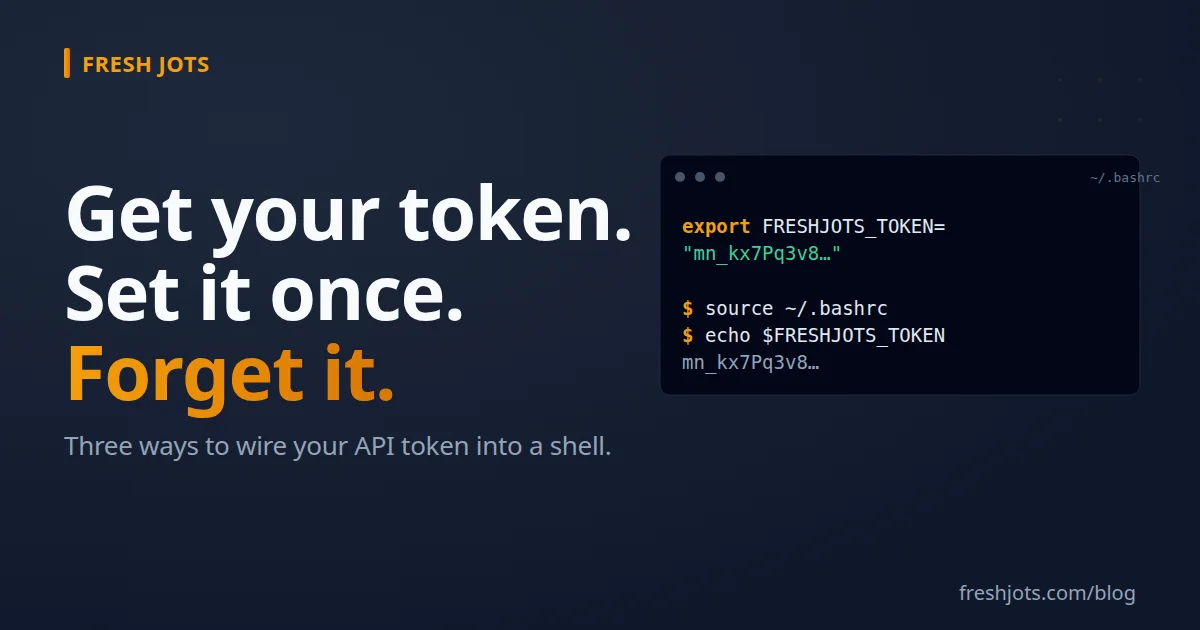
A. Shell profile — the daily default
Add one line to your shell profile so every new shell already has the token. The right file depends on your shell:
Add one line to your shell profile so every new shell already has the token. The right file depends on your shell:
- bash: `~/.bashrc` (Linux) or `~/.bash_profile` (macOS Terminal)
- zsh: `~/.zshrc` (default on macOS since Catalina)
- fish: `~/.config/fish/config.fish`
In `~/.bashrc` or `~/.zshrc`, add:
export FRESHJOTS_TOKEN="mn_yourrealtokenhere"
In `~/.config/fish/config.fish`, use fish's syntax:
set -gx FRESHJOTS_TOKEN "mn_yourrealtokenhere"
Then reload your current shell (so you don't have to open a new terminal):
source ~/.bashrc # or ~/.zshrc, or your fish config
Verify it took:
echo $FRESHJOTS_TOKEN
You should see your `mn_…` token printed back. An empty line means the export didn't land — see Troubleshooting below.
Why a profile, not just an export in your current terminal?
Tools that you launch from a shell (Claude Code, your editor's integrated terminal, a `tmux` session, a background `nohup` job) inherit the environment of the shell that launched them. If you `export` in terminal A and then start Claude Code in terminal B, terminal A's Claude doesn't see the new value — you'd have to restart it.
Why a profile, not just an export in your current terminal?
Tools that you launch from a shell (Claude Code, your editor's integrated terminal, a `tmux` session, a background `nohup` job) inherit the environment of the shell that launched them. If you `export` in terminal A and then start Claude Code in terminal B, terminal A's Claude doesn't see the new value — you'd have to restart it.
Putting the line in `~/.bashrc` or `~/.zshrc` means every new shell — and every tool launched from one — has the token automatically. Set it once, forget it.
B. Per-project `.env` — when one project needs its own token
For a CI job, a scoped token, or a workspace where you want the token to *only* exist while you're inside that directory, use a project-local `.env` file.
At the project root, create `.env`:
FRESHJOTS_TOKEN=mn_yourrealtokenhere
Then either:
- App-level loaders — Python (`python-dotenv`), Node (`dotenv` package), Ruby (`dotenv-rails`), Go (`godotenv`). Each reads `.env` on app start.
- `direnv` — `brew install direnv` (or your distro's package manager), add a `.envrc` next to `.env` that says `dotenv`, run `direnv allow` once. Every time you `cd` into the directory, the token loads; when you `cd` out, it unloads.
Always `.gitignore` your `.env`. Most language templates already do, but check before your first commit. A committed token is the most common way these leak — and tokens are unrecoverable once pushed to a public repo.
For teammates, commit a `.env.example` with the variable name and a placeholder so they know what to fill in:
FRESHJOTS_TOKEN=mn_replace_with_your_token
C. Ad-hoc / one-shot — for testing
Sometimes you just want to run **one** command with a specific token (testing a freshly-rotated token, swapping between two accounts, paste-and-go from a teammate's terminal). Prefix the variable to the command:
FRESHJOTS_TOKEN=mn_yourrealtokenhere freshjots append demo "hello"
The variable exists only for that one command. Your shell's environment is unchanged.
This is for testing, not daily use. If you find yourself typing the token inline more than once, move to A or B.
3. Verify everything works
3. Verify everything works
After setting the token by any method, two quick checks:
echo $FRESHJOTS_TOKEN
Prints your token if it's set in the current shell.
freshjots ls
(If you have the CLI installed.) Hits the API with your token and lists your notes. A 401 unauthorized means the token is wrong, revoked, or expired; a 403 forbidden means the token is valid but the account isn't cleared for API access (Free tier with no active trial, unconfirmed account, or an inactive Team plan); an empty body or command not found means the CLI isn't installed yet — see the CLI getting-started post.
If you don't have the CLI yet, a raw `curl`:
curl -H "Authorization: Bearer $FRESHJOTS_TOKEN" https://freshjots.com/api/v1/notes
A `200` with a JSON list of your notes means you're set.
4. Rotate / revoke — when something feels off
4. Rotate / revoke — when something feels off
If you accidentally commit the token to git, paste it in chat, or share-screen a terminal with it visible, revoke it immediately:
1. Visit api tokens page.
2. Click Revoke next to the affected token.
3. Mint a new one. Dev and Team accounts can create a replacement on the api tokens page. The 14-day trial is one per account and can't be re-issued once it's revoked, so if the trial is your only token, upgrade to Dev to mint a fresh one.
4. Update your shell profile / `.env` with the new token. Run `source ~/.bashrc` (or equivalent) so live shells pick it up.
The old token stops working the moment it's revoked. Any cron job, script, or running session that still has the old token in memory will get `401 unauthorized` on its next call — that's the signal that the rotation worked.
5. Troubleshooting: `echo $FRESHJOTS_TOKEN` comes back empty
5. Troubleshooting: `echo $FRESHJOTS_TOKEN` comes back empty
- Wrong file. On macOS you may need `~/.zshrc` (zsh) rather than `~/.bashrc`. On a fresh Ubuntu install with bash, login shells read `~/.bash_profile` first and only fall back to `~/.bashrc` if it doesn't exist.
- Forgot to reload. `source ~/.bashrc` (or open a new terminal).
- Trailing whitespace or curly quotes. Copy-pasting from a web page sometimes inserts non-ASCII quote characters or trailing spaces. Surface invisibles with:
grep FRESHJOTS ~/.bashrc | cat -et
(cat -et works on both Linux and macOS; macOS's cat rejects GNU's -A.) End-of-line is marked with $; any trailing spaces appear as blanks just before that $, and tabs show as ^I. The line should end exactly with "$ — a closing quote immediately followed by the dollar sign, nothing between them.
- The token has a literal `$` in it. Impossible (Fresh Jots tokens are [A-Za-z0-9_-] only — never $), but if you pasted into a double-quoted string in a different context, the shell may have interpolated. Single quotes ('…') prevent that.
6. A note on the Code vs Everyday mode toggle
6. A note on the Code vs Everyday mode toggle
API notes are always plain-text. The mode toggle on Settings page only changes what you see in the browser:
- Everyday — rich text notes, written via the browser editor.
- Code — plain-text notes, written via browser, API, or CLI.
A note appended via the API shows up in your Code mode view. If you don't see it after a successful API call, switch your mode to Code at the Settings page. You can flip between modes whenever — neither destroys the other's notes.
7. You're set. Now go append something
7. You're set. Now go append something
For a smooth experience, make sure you apply the bare essentials: Two easy steps to set up everything, and get you going.
freshjots append demo "first note from my terminal"
Or, if you haven't installed the CLI yet:
curl -X POST https://freshjots.com/api/v1/notes/by-filename/demo/append \ -H "Authorization: Bearer $FRESHJOTS_TOKEN" \ -H "Content-Type: application/json" \ -d '{"text":"first note from my terminal"}'Either one returns the updated note. Open `https://freshjots.com/notes` in your browser and find your new `demo` note waiting.
For the bigger picture of what the API lets you do, see: Everything You Can Do Here.
For the bigger picture of what the API lets you do, see: Everything You Can Do Here.