·
16 min read
Setting up a dead-man's switch — by hand, or by API
Setting up a dead-man's switch — by hand, or by API
This is the operator's companion to The dead-man's switch — Fresh Jots watches for the silence so you don't have to. That post explains *what* the switch does and *how it behaves*. This one is the procedure: every step to put a switch on a note, both through the web UI and through the API, with the exact requests, the response you get back, and every way it can refuse you.
If you run crons, deploy bots, backup jobs, or anything that's *supposed to keep writing*, this is the page to keep open while you wire it up.
1. The model, in one paragraph
1. The model, in one paragraph
A dead-man's switch is two fields on a single note: `append_deadline_hours` (the longest silence you'll tolerate) and an optional `alert_email` (where the warning goes; blank means your account email). The `append_deadline_hours` field can only be set on a note that is already append-only — the deadline is meaningless on a note that could be silently rewritten. (`alert_email` is only the destination; on its own, with no deadline, it does nothing.) The clock runs from the note's **last append**, or — if it has never been appended to — from **when you armed the switch** (setting or changing the deadline restamps the timer to "now"), falling back to the **creation time** only for a note armed at creation. Either way a job that dies on its very first run still trips, and arming the switch on a note that has sat idle for a while starts a fresh countdown instead of firing immediately. You need a Dev or Team plan (or an active 14-day trial — the trial behaves exactly like Dev here). That's the whole contract; everything below is just how to apply it.
The deadline is an integer number of hours, from 1 (minimum) to 720 (maximum — 30 days). Values outside that range are rejected.
2. Part 1 — By hand, in the browser
2. Part 1 — By hand, in the browser
No code, nothing to install, nothing running on your machine.
1. Create the note, or open one you already have. It can start empty — a title is enough. The script that writes to it fills in the body over time.
2. Lock it to append-only. This is the per-note control that says "from here on, this can only be added to — never edited, never deleted." Until a note is locked, the dead-man option does not appear on it.
3. Open the note's Settings and fill in "Hours without an append." Pick the longest silence you'd ever tolerate before you'd want to be told: a few hours for a job that runs every few minutes, a couple of days for something that checks in weekly. Anything from 1 hour to 30 days.
4. *(Optional)* Set alert email if the warning should go somewhere other than your account email — an on-call inbox, a specific teammate. Leave it blank and it comes to you.
5. Save. The note is now watched. Fresh Jots scans from its side roughly every ten minutes; there is nothing to start.
To stop watching: return to the same Settings page and clear the "Hours without an append" field. That is the only maintenance there ever is.
3. A complete worked example
3. A complete worked example
A deploy script arms the switch; the cron checks in; a decommission script removes it. Three files, the whole lifecycle.
`deploy.sh` — create the note locked, then arm a 25-hour deadline:
```bash
NOTE='{"note":{"title":"nightly-backup","plain_body":"watch armed","append_only":true}}'
curl -fsS -X POST https://freshjots.com/api/v1/notes \
-H "Authorization: Bearer $FRESHJOTS_TOKEN" -H "Content-Type: application/json" \
-d "$NOTE" >/dev/null
curl -fsS -X PATCH https://freshjots.com/api/v1/notes/by-filename/nightly-backup \
-H "Authorization: Bearer $FRESHJOTS_TOKEN" -H "Content-Type: application/json" \
-d '{"note":{"append_deadline_hours":25,"alert_email":"oncall@example.com"}}' >/dev/null
```
Change the number in the PATCH body to 1, if you want 1-hour reporting, which is the floor.
Re-running `deploy.sh` once the note already exists makes the **first** `curl` exit non-zero: the create hits a `422` filename-collision (`a note with filename '…' already exists`), and `-f` turns any 4xx into a non-zero exit. It's harmless as written — there's no `set -e`, so the arming PATCH still runs and is fully idempotent — but if you want a clean deploy log, either drop `-f` from the create call or append `|| true` to it.
Change the number in the PATCH body to 1, if you want 1-hour reporting, which is the floor.
Re-running `deploy.sh` once the note already exists makes the **first** `curl` exit non-zero: the create hits a `422` filename-collision (`a note with filename '…' already exists`), and `-f` turns any 4xx into a non-zero exit. It's harmless as written — there's no `set -e`, so the arming PATCH still runs and is fully idempotent — but if you want a clean deploy log, either drop `-f` from the create call or append `|| true` to it.
`/etc/cron.d/backup` — the nightly job appends only on success:
```cron
0 3 * * * root /usr/local/bin/backup.sh && curl -fsS -X POST -H "Authorization: Bearer $FRESHJOTS_TOKEN" -H "Content-Type: application/json" -d '{"text":"backup ok"}' https://freshjots.com/api/v1/notes/by-filename/nightly-backup/append
```
`decommission.sh` — retire the job, disarm the switch:
```bash
curl -fsS -X PATCH https://freshjots.com/api/v1/notes/by-filename/nightly-backup \
-H "Authorization: Bearer $FRESHJOTS_TOKEN" -H "Content-Type: application/json" \
-d '{"note":{"append_deadline_hours":null}}' >/dev/null
```
Between `deploy.sh` and `decommission.sh` you never touch a settings page. If `backup.sh` ever exits non-zero, the `&&` means no append happens, the 25-hour clock runs out, and you get exactly one email — then the next good run silently re-arms it.
4. Part 2 — By API
4. Part 2 — By API
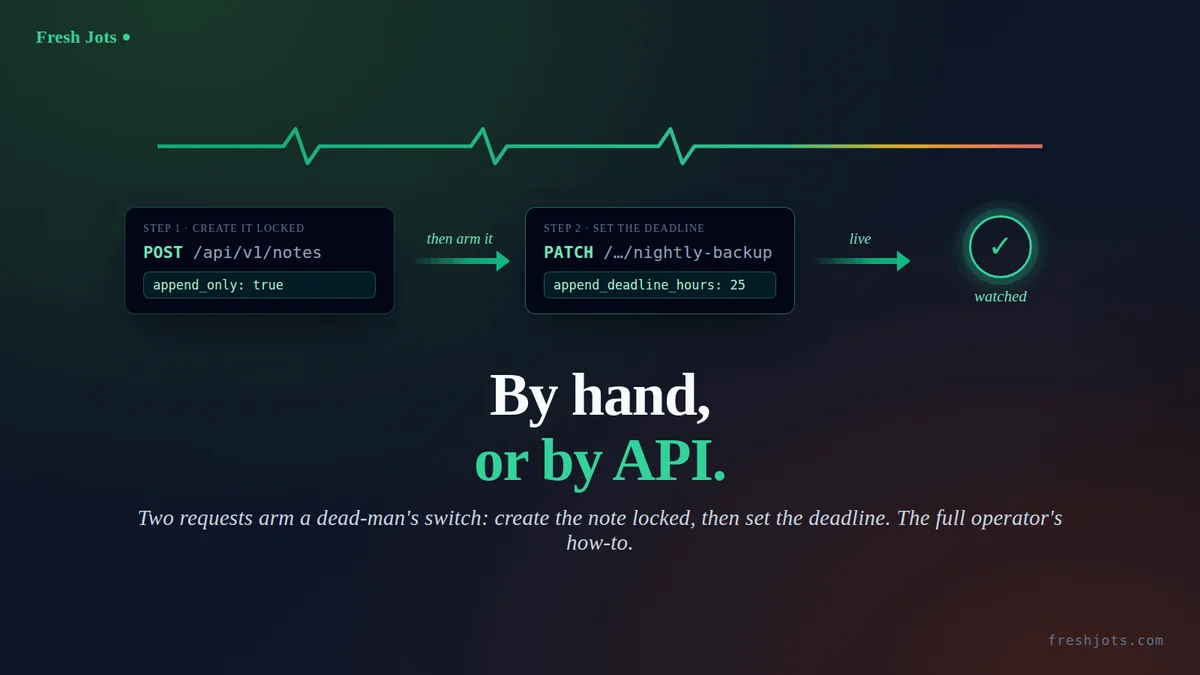
Everything above can be scripted, with one exception called out at the end. The API path is two requests: create the note locked, then arm the deadline. Creation never sets the deadline itself — Fresh Jots treats the deadline as a *setting* on an already-append-only note, so it is always applied with its own follow-up call. This is deliberate and it never changes.
A. Authentication
A. Authentication
Every call carries a bearer token:
```
Authorization: Bearer $FRESHJOTS_TOKEN
```
Generate a token in Settings → API. A personal token needs the Dev tier; a team token needs the team's plan to be active; a 14-day trial token works without either. The account must be confirmed. All endpoints below are under `https://freshjots.com/api/v1`.
A note on request bodies: create and update take a `note`-wrapped JSON object — `{"note": { ... }}`. The append endpoint is the one exception; it takes a bare `{"text": "..."}`.
B. Step 1 — Create the note, locked
B. Step 1 — Create the note, locked
```bash
curl -fsS -X POST https://freshjots.com/api/v1/notes \
-H "Authorization: Bearer $FRESHJOTS_TOKEN" \
-H "Content-Type: application/json" \
-d '{"note":{"title":"nightly-backup","plain_body":"watch armed","append_only":true}}'
```
`append_only: true` is the important part — it creates the note already locked, so the next call can arm it. (`plain_body` is required on create; a single line like `watch armed` is fine.) The response is the full note JSON — trimmed below to the fields that matter for the switch; the real payload also returns `format`, `folder_id`, `pinned`, the `webhook_*` fields, `plain_body`, and `byte_size`:
```json
{
"id": 4812,
"filename": "nightly-backup",
"title": "nightly-backup",
"append_only": true,
"append_deadline_hours": null,
"alert_email": null,
"last_appended_at": null,
"alerted_at": null,
"created_at": "2026-05-16T18:00:00Z",
"updated_at": "2026-05-16T18:00:00Z"
}
```
Note `append_deadline_hours` is still `null`. The switch is not armed yet — that's Step 2. Keep the `id` (`4812`) or the `filename` (`nightly-backup`); either one addresses the note in Step 2.
C. Step 2 — Arm the switch
C. Step 2 — Arm the switch
Two equivalent ways. By id:
```bash
curl -fsS -X PATCH https://freshjots.com/api/v1/notes/4812 \
-H "Authorization: Bearer $FRESHJOTS_TOKEN" \
-H "Content-Type: application/json" \
-d '{"note":{"append_deadline_hours":25,"alert_email":"oncall@example.com"}}'
```
By filename — no id round-trip, ideal for config-as-code where the script only knows the note by name:
```bash
curl -fsS -X PATCH https://freshjots.com/api/v1/notes/by-filename/nightly-backup \
-H "Authorization: Bearer $FRESHJOTS_TOKEN" \
-H "Content-Type: application/json" \
-d '{"note":{"append_deadline_hours":25,"alert_email":"oncall@example.com"}}'
```
Either returns the updated note with `append_deadline_hours: 25`. The switch is now live. This settings PATCH is allowed even though the note is locked — locking blocks *content* changes, not *settings* changes.
D. Pointing the job at the note
D. Pointing the job at the note
Your job appends on success — exactly as in [Write to Fresh Jots from a cron job](/blog/write-to-fresh-jots-from-cron). The minimal form:
```bash
curl -fsS -X POST https://freshjots.com/api/v1/notes/by-filename/nightly-backup/append \
-H "Authorization: Bearer $FRESHJOTS_TOKEN" \
-H "Content-Type: application/json" \
-d '{"text":"backup ok '"$(date -Is)"'"}'
```
Every successful append pushes the deadline forward and silently clears any alert. A run that fails (and therefore doesn't append) lets the clock run out, and you hear about it once.
E. Streaming every check-in to your own URL
The dead-man email tells you when a job goes *silent*. A webhook is its inverse: a live feed of every *successful* check-in. Set `webhook_url` (and an optional `webhook_secret`) and they ride in exactly the same settings PATCH as the deadline — same `note`-wrapped body, by id or `by-filename`, allowed on the locked note because they're settings, not content. From then on every successful append POSTs a JSON payload — the appended chunk plus the note's new `byte_size` — to that URL; every **generic-format** delivery carries an `X-FreshJots-Signature` header — `sha256=` followed by an HMAC-SHA256 (lowercase hex) of the raw body (the `slack` and `discord` chat formats are delivered unsigned — see section F); once you set a `webhook_secret` that HMAC is keyed on it, so your receiver can verify the call really came from Fresh Jots before it pages anyone (with no secret the key is the empty string and the header is safe to ignore). It carries the same contract as the switch itself — Dev or Team (or an active trial), append-only note only — and it self-protects: ten consecutive failed deliveries trip a circuit breaker (`webhook_disabled_at` goes non-null) so a dead receiver stops draining the queue, and re-PATCHing `webhook_url` to a *changed* value resets the failure count and re-arms it — and once the breaker has actually tripped (`webhook_disabled_at` is set), re-sending the **same** URL re-arms it too (in fact any save of a disabled note does), so the set-to-`null`-and-back dance isn't needed; a *mid-flight* count that hasn't tripped the breaker yet is deliberately left untouched by a same-URL save, so it stays a flakiness diagnostic. The secret is write-only: a `GET` returns `webhook_url`, `webhook_failure_count`, and `webhook_disabled_at` so a monitoring script can see the endpoint's health, but never the secret back over the wire. Point it at an automation hook, a pager, or your own endpoint and you get the switch's silence-alarm and a real-time heartbeat from the one note, with no polling — exactly what lands on the wire, and what can legally sit on the other end, is the next section.
F. What the webhook is, what it sends, and what can receive it
F. What the webhook is, what it sends, and what can receive it
What it is. A webhook here is *outbound, one-way, machine-to-machine* — not a "publish this note over there" link. It is Fresh Jots making an HTTP request *to a URL you control* every time the note is appended to. There is no rendering, no login, no UI on the other end; there is a program that receives a POST.
What it does. On every successful append, Fresh Jots sends a single HTTP `POST` to `webhook_url`:
```http
POST /your/endpoint HTTP/1.1
Content-Type: application/json
User-Agent: FreshJots-Webhook/1.0
X-FreshJots-Event: note.appended
X-FreshJots-Delivery: 7c9e6679-7425-40de-944b-e07fc1f90ae7
X-FreshJots-Signature: sha256=<HMAC-SHA256 of the raw body, keyed on webhook_secret>
```
```json
{
"event": "note.appended",
"delivered_at": "2026-05-16T18:00:00Z",
"delivery_id": "7c9e6679-7425-40de-944b-e07fc1f90ae7",
"note": {
"id": 4812,
"filename": "nightly-backup",
"title": "nightly-backup",
"byte_size": 1234,
"last_appended_at": "2026-05-16T18:00:00Z"
},
"appended_text": "backup ok 2026-05-16T03:00:01+00:00",
"appended_bytes": 36,
"appended_truncated": false
}
```
`appended_text` is a preview capped at 8 KB (`appended_truncated: true` when it was clipped — the full body is always retrievable from the API). `appended_bytes` is the byte count the append actually added: the chunk plus the newline that joins it to any existing content, so it is normally one greater than the byte length of `appended_text` (the two are equal only when the note was empty before this append). Delivery applies a 5-second cap to *each* phase — connect, write, and read — so a slow receiver can hold one attempt for up to ~15 s before it counts as a failure; it follows up to five redirects and is not retried. Any non-2xx response, timeout, or connection error is a failure; ten consecutive failures auto-disable the hook (`webhook_disabled_at`). In production the URL must resolve to a public address — loopback, RFC-1918 private, link-local (including the `169.254.169.254` cloud-metadata endpoint), and multicast ranges are all refused (an SSRF guard), so iterate against a tunnel (ngrok, smee) rather than `localhost`.
What can accept its payload is therefore anything that can *receive an HTTP POST and parse JSON* — never a human-facing page. In practice, three shapes:
- A no-code automation "catch hook" — Zapier, Make, Pipedream, n8n. Paste their generated URL into `webhook_url`; they ingest our payload verbatim and fan it out to Slack, email, a spreadsheet, a pager, Facebook, or anything they integrate with. This is the right answer for almost everyone and the only one needed for "I want it in my Slack/Facebook."
- Your own endpoint — any route, any language, that replies `2xx`. Recompute `HMAC-SHA256(raw_body, webhook_secret)`, compare it in constant time against `X-FreshJots-Signature` to prove the call is genuinely from Fresh Jots, then do whatever you want with the event.
- A Slack or Discord "incoming webhook" — natively supported. Set the note's `webhook_format` to `slack` or `discord` — on the Settings page, or in the same settings PATCH: `{"note":{"webhook_url":"https://hooks.slack.com/services/…","webhook_format":"slack"}}` — and Fresh Jots reshapes every check-in into that platform's own schema (`{"text":"…"}` for Slack, `{"content":"…"}` for Discord) and posts it *straight* to the incoming-webhook URL, no adapter in between. Chat-format deliveries are not HMAC-signed (a chat incoming webhook can't verify a signature — the unguessable hooks URL is the credential), and each is a short "📝 *note-name* — append (N bytes)" line with a fenced preview, clipped to fit the platform (Slack ~3500 characters, Discord ~1900). Leave `webhook_format` at its default `generic` for the signed JSON envelope described above; the no-code adapters below are only needed for other destinations.
What cannot receive it: a Slack channel page, another Fresh Jots note's URL, a Facebook or X profile, or any web page meant for a human to look at — none of those accept a programmatic JSON POST, and aiming the hook at one just burns it down to `webhook_disabled_at`.
How to implement it.
1. Stand up a receiver. Fastest: create a "Webhook" trigger in Zapier/Make/Pipedream and copy its URL. For full control: a one-route service that returns `200` and verifies the signature.
2. Choose a `webhook_secret` (any string, up to 64 characters) and store a copy where the receiver can read it — this is what makes signature verification possible. Treat it like a credential; it is never returned by the API once set.
3. Arm it with the same settings PATCH as the deadline:
```bash
curl -fsS -X PATCH https://freshjots.com/api/v1/notes/by-filename/nightly-backup \
-H "Authorization: Bearer $FRESHJOTS_TOKEN" \
-H "Content-Type: application/json" \
-d '{"note":{"webhook_url":"https://hooks.zapier.com/hooks/catch/123/abc","webhook_secret":"keep-this-safe"}}'
```
4. Trigger one append and confirm a `2xx` comes back. Thereafter, `GET` the note any time to read `webhook_failure_count` and `webhook_disabled_at`. If it ever disables, fix the receiver and save the note again to re-arm: PATCH `webhook_url` to a changed value **or the same one** — because the hook is disabled, either resets the counter and resumes deliveries, so keeping the same endpoint needs no set-to-`null`-and-back dance. (Before the breaker trips, a same-URL save leaves a mid-flight failure count alone; only a changed URL, or the disable itself, clears that.)
G. Changing or clearing the switch
G. Changing or clearing the switch
Change the deadline or the alert address — same PATCH, new values:
```bash
curl -fsS -X PATCH https://freshjots.com/api/v1/notes/by-filename/nightly-backup \
-H "Authorization: Bearer $FRESHJOTS_TOKEN" \
-H "Content-Type: application/json" \
-d '{"note":{"append_deadline_hours":49}}'
```
Turn the switch off — set the deadline to `null`. This is what a decommission script runs when a job is retired:
```bash
curl -fsS -X PATCH https://freshjots.com/api/v1/notes/by-filename/nightly-backup \
-H "Authorization: Bearer $FRESHJOTS_TOKEN" \
-H "Content-Type: application/json" \
-d '{"note":{"append_deadline_hours":null}}'
```
The note stays; only the watch is removed.
H. Reading the current state
H. Reading the current state
`GET` the note to see where it stands without changing anything:
```bash
curl -fsS https://freshjots.com/api/v1/notes/by-filename/nightly-backup \
-H "Authorization: Bearer $FRESHJOTS_TOKEN"
```
Three fields tell you everything:
- `append_deadline_hours` — `null` means not watched; a number means armed.
- `last_appended_at` — when the job last checked in (`null` if it never has; the clock then runs from `created_at`).
- `alerted_at` — `null` in the healthy state. Non-null means an overdue alert has already fired and not yet been re-armed by a fresh append.
A monitoring script can poll this to confirm its own switches are still armed — useful after a config rebuild.
I. How it refuses you
Errors come back as `{"error":{"code":"...","message":"..."}}` — `code` is the stable, branch-on-it value; `message` is human-readable and already names the offending field. (Some validation failures raised deeper in the stack also carry a `details` array of per-field messages, but the dead-man errors below return `code` + `message` only — branch on `code`.) The ones you'll meet setting this up:
| Situation | HTTP | `code` |
| Situation | HTTP | `code` |
|---|---|---|
| Deadline below 1 or above 720, or non-integer | 422 | `validation_failed` |
| `append_deadline_hours` set on a note that isn't append-only | 422 | `validation_failed` |
| Switch fields used without Dev/Team (and not a trial) | 422 | `validation_failed` |
| Malformed or credential-bearing `webhook_url` (not http(s), no host, or `user:pass@`) | 422 | `validation_failed` |
| Token tier can't use the API at all | 403 | `forbidden` |
| Bad/missing token | 401 | `unauthenticated` |
| Wrong-owner or unknown note/filename | 404 | `not_found` |
| Trying to PATCH *content* (body/title) on a locked note | 403 | `note_locked` |
The append-only rule is enforced at save time, so it surfaces on the Step 2 PATCH, not on creation — creation carries no deadline, so there is nothing to validate yet. The tier rule is checked earlier still: it lives on the token. A token that can't use the API is rejected `403 forbidden` on *every* call, including the Step 1 create — you never get as far as a Step 2 `422` for it.
J. The one browser-only step
There is exactly one thing the API cannot do: take a note that already exists and is still editable and convert it to append-only. That lock flip is a deliberate, one-time action you take in the UI. The API's route around it is the one shown above — *create* the note already locked (`append_only: true`), so no conversion is ever needed in an automated flow. Once a note is append-only, everything else — arming, re-arming, changing the deadline, changing the alert address, turning it off — is fully scriptable, by id or by filename.
5. Try it free for 14 days. No card.
5. Try it free for 14 days. No card.
Sign up at freshjots.com, pick Plain notes mode at onboarding, and a 14-day trial token lands in your inbox — dead-man alerts included, identical to paid Dev. Run the two-step setup above against a throwaway note and watch it fire. After 14 days, Dev is $149/yr. The full endpoint reference lives at /docs under Watchdog & webhooks.
6. Further reading
6. Further reading
Everything You Can Do Here — for multiple use options in your benefit.
Get your Fresh Jots API token — How to get and set your API token, 14-day free trial period, no credit card needed.
Be sure to check out a dedicated error reports page to inspect why an error occurred, in case of an API call that didn't go through.
Get your Fresh Jots API token — How to get and set your API token, 14-day free trial period, no credit card needed.
Be sure to check out a dedicated error reports page to inspect why an error occurred, in case of an API call that didn't go through.