·
23 min read
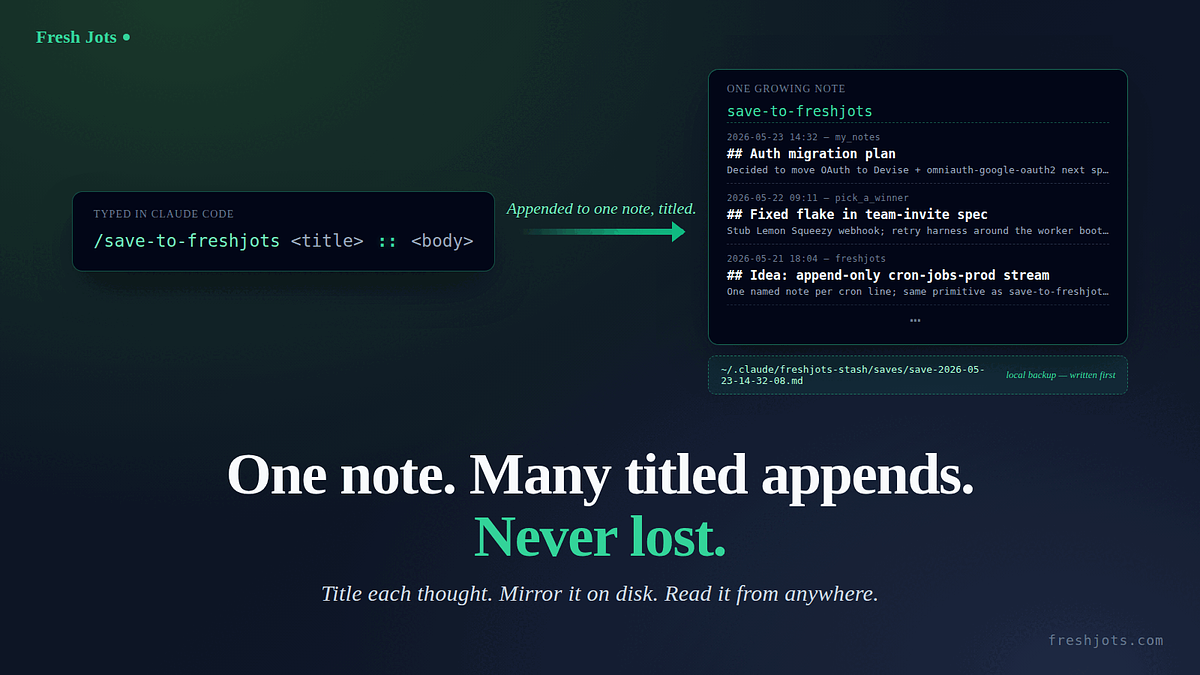
`/save-to-freshjots <title> :: <body>` — one running engineering journal, one titled append
`/save-to-freshjots <title> :: <body>` — one running engineering journal, one titled append
A Claude Code session ends and the thinking ends with it. The "that's a clean pattern I want to remember" thought, the "next time I touch auth I should..." note, the structured wrap-up of what we just changed — it's all in the transcript while the tab is open, and gone the moment you close it. The usual fixes spin up *another* note every time: an `ai_sessions/` folder with one verbatim transcript per session, or a `session_summaries/` folder with one digest per session. Both useful, but you end up with a folder full of orphans, and on the Free / trial tier each session burns one of your ten note slots. This is the third shape, and the lightest, a `/save-to-freshjots` slash command for Claude Code. The shape is fixed: you pass a title and a body separated by a literal `::`.
Type `/save-to-freshjots Auth migration plan :: Decided to move OAuth to Devise + omniauth-google-oauth2 next sprint; stash idea at app/services/auth/migrator.rb` and the title becomes a `##` heading, the body becomes the prose underneath, and the whole titled entry gets appended to a single note literally named `save-to-freshjots`. The title-first shape is the point: every entry has a scannable headline you can skim down the growing note for, and the command is for *thoughts you've already had* rather than for auto-composing them. `/summarize-session-to-freshjots` is the auto-digest sibling that reads the current session and writes a long-form structured multi-section page; `/save-to-freshjots` is the one you reach for when you already know what the headline is. Either way you end up with **one growing note** at freshjots.com that reads, end to end, as a chronological journal, plus a per-invocation file in `~/.claude/freshjots-stash/saves/` written before the upload and never deleted.
Type `/save-to-freshjots Auth migration plan :: Decided to move OAuth to Devise + omniauth-google-oauth2 next sprint; stash idea at app/services/auth/migrator.rb` and the title becomes a `##` heading, the body becomes the prose underneath, and the whole titled entry gets appended to a single note literally named `save-to-freshjots`. The title-first shape is the point: every entry has a scannable headline you can skim down the growing note for, and the command is for *thoughts you've already had* rather than for auto-composing them. `/summarize-session-to-freshjots` is the auto-digest sibling that reads the current session and writes a long-form structured multi-section page; `/save-to-freshjots` is the one you reach for when you already know what the headline is. Either way you end up with **one growing note** at freshjots.com that reads, end to end, as a chronological journal, plus a per-invocation file in `~/.claude/freshjots-stash/saves/` written before the upload and never deleted.
The named-stream shape is the point. Under the hood it's one POST to `/api/v1/notes/by-filename/save-to-freshjots/append` — the Fresh Jots API's signature primitive: an append-by-name endpoint with find-or-create semantics. First call creates the note; every subsequent call adds a line. No folder to bootstrap, no id to look up, no setup step at all. The same one-line shape that lets you wire `cron-jobs-prod`, `payments-product-X`, or `failed-deploys` into named streams next, once the journal habit sticks.
Under five minutes. One copy-paste. No prior setup needed beyond Claude Code itself.
1. What you need
1. What you need
- **Claude Code** installed and working (you can connect any AI coding agent to Fresh Jots).
- A few minutes.
- That's it.
You don't need a Fresh Jots account yet — the prompt will walk you through signing up and creating an API token. Pick the **"Plain notes"** mode at onboarding — its card says *"Includes a 14-day free API trial"* — and a 14-day API trial token lands in your inbox automatically. It unlocks the REST API but otherwise keeps **Free-tier limits** — 10 notes total across the whole account, 1 MB per note, 50 MB storage — *not* Pro-tier allowances; it is an API trial, not a Pro trial. The trial is issued only the first time you onboard in that mode, so don't pick "Everyday note keeping" first intending to switch later. After two weeks, decide whether the habit has earned the **$149/yr Pro tier** (10,000 plain notes, 3 active tokens, REST API, dead-man alerts, webhooks, folders).
You don't need `jq` or `curl` already installed — Claude Code will check and, if anything's missing, tell you the one package-manager command to run and wait for your "go."
There is no GitHub CLI prerequisite here (unlike the [PR-description command](/blog/one-prompt-pr-description-to-fresh-jots)). This one doesn't read anything external and doesn't read the session either — it only ever uses the title and body you pass it on the slash-command line.
2. About your token
2. About your token
The prompt will ask you to paste your `mn_…` token into the chat once. That paste briefly lives in this session's transcript. This command only uploads the *entry it builds in step 1* from the title and body you typed after the slash command — so the token does not end up in any note as long as you don't ask Claude to include it.
For zero token exposure, read two easy steps to set up everything, and get you going; set `FRESHJOTS_TOKEN` in your shell profile first (one line — `export FRESHJOTS_TOKEN="mn_…"` in `~/.bashrc` or `~/.zshrc`), reload the shell, then paste the prompt. The prompt detects the already-exported value and skips the paste step entirely. If you've already run the auto-archive, summarize-session, or PR-description setup, `FRESHJOTS_TOKEN` is already in your profile and this prompt sails right past the token step.
3. The prompt
3. The prompt
Open Claude Code anywhere. Paste the block below verbatim, hit enter, then answer the questions it asks you. The prompt is the only thing you have to do by hand.
> **Prefer to download it?** The whole thing is also a plain-text file: **[download `claude-code-save-to-freshjots-prompt.txt`](/downloads/claude-code-save-to-freshjots-prompt)**. It's the *exact* block below — a single self-contained setup prompt that walks Claude Code through token bootstrap and writing the `/save-to-freshjots` slash command. Use the download if your paste misbehaves: rendered blog text can pick up smart quotes (`"` → `"`) or drop a line break, which breaks the JSON and bash inside the prompt. The download has no rendering pipeline in between, so it's byte-for-byte what you need.
````text
````text
I want you to install a `/save-to-freshjots` slash command for Claude Code, end to end. Walk me through it conversationally; ask me only what you genuinely can't figure out yourself. Be safe: show diffs before writing any file in my home directory, and never write my API token to any file in the current project or echo it back to me after I paste it.
End state we're aiming for:
- A slash command file at ~/.claude/commands/save-to-freshjots.md (full content in step 3 below).
- A ~/.claude/freshjots-stash/saves/ directory created (empty until you first run the command).
- My shell profile (~/.zshrc if my $SHELL ends in zsh, otherwise ~/.bashrc) exports FRESHJOTS_TOKEN (skipped if it already does).
After setup, typing `/save-to-freshjots <title> :: <body>` in any Claude Code session will: (a) split the argument on the FIRST `::` (the body itself may contain further `::` substrings without confusing the split), trim both sides, and refuse the input with a one-line usage error if the argument is empty, missing the `::` separator, or empty on either side after trimming, (b) assemble the title and body into a titled markdown entry — a `## <title>` heading, a blank line, then the body verbatim, (c) write a local backup to ~/.claude/freshjots-stash/saves/ that is kept indefinitely, (d) APPEND that entry to my Fresh Jots note named "save-to-freshjots" via the by-filename/append endpoint (creating the note on the first call), (e) report the local backup path and a one-liner to retry the upload if anything went sideways.
Idempotent by design: if I re-run this prompt later, every step should detect existing state (env var set, slash command file unchanged, stash dir present) and no-op. Tell me which steps you skipped and why.
Step 1 — Confirm intent. Tell me in one sentence what you're about to do. Ask me to type "yes" before you touch any file. After I've confirmed once, you can proceed through the remaining steps without asking again unless you hit a destructive edit you can't reverse.
Step 2 — Token bootstrap.
- Check presence without printing the value: `[ -n "${FRESHJOTS_TOKEN:-}" ] && echo set || echo unset`. Use that output, never `printenv FRESHJOTS_TOKEN` or `echo $FRESHJOTS_TOKEN` (those would dump the value into the transcript).
- **If "set"** (the token was already exported when Claude Code launched): verify with `curl -sS -o /dev/null -w '%{http_code}' --max-time 15 -H "Authorization: Bearer $FRESHJOTS_TOKEN" https://freshjots.com/api/v1/folders`. The literal `$FRESHJOTS_TOKEN` stays in the command as written; the shell expands it at runtime, so the actual value never appears in stdout, stderr, or the transcript. Expect 200. On 401, tell me my token is set but rejected, and ask me to generate a fresh one. On success, jump to step 3 — do NOT touch my shell profile, the token is already wired in.
- **If "unset"**, tell me: "Go to https://freshjots.com, sign up (free, no card). At onboarding, pick the 'Plain notes' mode (its card mentions a 14-day free API trial) — that gets you a 14-day API trial token automatically. If you already have a Pro account, Settings → API tokens → Create token. Either way, you'll end up with an `mn_...` string. Paste it here when you have it."
- Once I paste a token, verify it with one curl call, substituting the literal `mn_...` value into the Authorization header (this single command is the only place the value appears outside my shell profile — unavoidable for the paste-in-chat flow): `curl -sS -o /dev/null -w '%{http_code}' --max-time 15 -H "Authorization: Bearer mn_THE_VALUE_I_PASTED" https://freshjots.com/api/v1/folders`. Expect 200. On 401, tell me politely "that token didn't work — paste another?" and retry up to 3 times.
- After verification, append `export FRESHJOTS_TOKEN="mn_..."` to my shell profile (~/.zshrc if my $SHELL ends in zsh, otherwise ~/.bashrc). Show me the diff before writing. If `grep -l FRESHJOTS_TOKEN ~/.bashrc ~/.zshrc ~/.profile 2>/dev/null` finds it elsewhere already, skip this step and tell me where it lives.
- Never write the raw token to any file in the current repo, and never echo it back into the chat after that one verify call. From this step on, refer to it only as `$FRESHJOTS_TOKEN` in any bash command — let the shell expand it.
Step 3 — Slash command file. Write the content below to ~/.claude/commands/save-to-freshjots.md (create the directory if missing). If the file already exists with identical content, skip. If it exists with different content, show me the diff and ask before overwriting.
Slash command content (write this verbatim, no edits, no improvements — the leading `---` and frontmatter fields are load-bearing):
---
description: Append a titled entry to my Fresh Jots save-to-freshjots note — title and body separated by a literal ::
argument-hint: <title> :: <body>
allowed-tools: Bash, Write
---
Append one titled entry to the user's Fresh Jots note named `save-to-freshjots`. The slash command takes exactly one argument shaped as a title and a body separated by a literal `::`.
The argument I passed is: $ARGUMENTS
## Step 1 — parse the argument and build the entry
Split `$ARGUMENTS` on the FIRST occurrence of `::` (a literal two-colon separator). Everything before the first `::` is the title; everything after is the body. Trim leading and trailing whitespace from both sides. The body itself may contain further `::` substrings — only the first occurrence is the separator, so a body like `before :: after` is preserved verbatim once the leading title has been peeled off.
Validate, in order:
- `$ARGUMENTS` is non-empty after trimming.
- It contains `::`.
- After splitting and trimming, BOTH the title and the body are non-empty.
If ANY of those checks fail, do NOT compose anything, do NOT write any file, do NOT call the Bash tool, do NOT touch the API. Print exactly this two-line message and stop:
Usage: /save-to-freshjots <title> :: <body>
Both sides of `::` are required and non-empty.
When validation passes, assemble the entry as plain markdown: a level-2 heading made from the title (`## <title>`), one blank line, then the body verbatim (preserve the user's line breaks and any inline markdown they typed). The title goes through verbatim too — don't second-guess capitalization, don't add trailing punctuation, don't reflow.
Illustrative example (don't echo this literally — use the user's actual title and body):
Input: `/save-to-freshjots Auth migration plan :: Decided to move OAuth to Devise + omniauth-google-oauth2 next sprint; stash idea at app/services/auth/migrator.rb`
Assembled entry:
## Auth migration plan
Decided to move OAuth to Devise + omniauth-google-oauth2 next sprint; stash idea at app/services/auth/migrator.rb
Write the assembled entry to `/tmp/cc-save-entry.md` using the Write tool. That file is what step 2 backs up locally and appends to the Fresh Jots note.
## Step 2 — back it up locally, then append
Run this bash block via the Bash tool. It timestamps the entry, prefixes a header with the current working directory's basename, writes the durable local backup FIRST, then POSTs the append to Fresh Jots:
set -uo pipefail
[ -n "${FRESHJOTS_TOKEN:-}" ] || { echo "FRESHJOTS_TOKEN not set"; exit 1; }
[ -s /tmp/cc-save-entry.md ] || { echo "entry file missing or empty"; exit 1; }
TS=$(date +%Y-%m-%d-%H-%M-%S)
TS_HUMAN=$(date +"%Y-%m-%d %H:%M")
PROJECT=$(basename "$PWD")
STASH_DIR="$HOME/.claude/freshjots-stash/saves"
mkdir -p "$STASH_DIR"
STASH_PATH="$STASH_DIR/save-${TS}.md"
# The on-disk file IS the entry that will be appended to the FJ note,
# header and all. That way the FJ stream reads as a chronological journal,
# and ~/.claude/freshjots-stash/saves/ is a byte-for-byte mirror of every
# entry you've ever appended.
{
echo ""
echo "---"
echo ""
echo "$TS_HUMAN — $PROJECT"
echo ""
cat /tmp/cc-save-entry.md
} > "$STASH_PATH"
echo "Local backup: $STASH_PATH"
PAYLOAD=$(jq -Rs '{text: .}' < "$STASH_PATH")
RESP=$(mktemp); trap 'rm -f "$RESP"' EXIT
STATUS=$(curl -sS -o "$RESP" -w '%{http_code}' --max-time 30 \
-X POST "https://freshjots.com/api/v1/notes/by-filename/save-to-freshjots/append" \
-H "Authorization: Bearer $FRESHJOTS_TOKEN" \
-H "Content-Type: application/json" \
-H "Idempotency-Key: save-${TS}" \
--data "$PAYLOAD")
case "$STATUS" in
200|201)
ID=$(jq -r '.id // "?"' < "$RESP")
rm -f /tmp/cc-save-entry.md
echo "Appended to note #${ID} (save-to-freshjots)."
echo "Backup kept at: ${STASH_PATH}"
echo "Open the growing note at: https://freshjots.com/notes (look for 'save-to-freshjots')."
;;
*)
echo "Append failed: status=$STATUS body=$(head -c 256 "$RESP")"
echo "Your entry is SAFE — local backup at ${STASH_PATH} (and /tmp/cc-save-entry.md)."
echo "Retry the upload later with:"
echo " curl -X POST https://freshjots.com/api/v1/notes/by-filename/save-to-freshjots/append \\"
echo " -H \"Authorization: Bearer \$FRESHJOTS_TOKEN\" \\"
echo " -H 'Content-Type: application/json' \\"
echo " -H 'Idempotency-Key: save-${TS}' \\"
echo " --data \"\$(jq -Rs '{text: .}' < ${STASH_PATH})\""
exit 2
;;
esac
## Step 3 — report
Tell the user what just landed: the note id, the local backup path, and the URL to read the growing save-to-freshjots note in the Fresh Jots UI. If the append failed, lead with the reassurance that the entry is preserved locally, give the backup path, and the retry curl one-liner. Do not retry the upload yourself — print it and let the user decide; a transient outage is theirs to schedule a retry for.
(End of slash command content — that's everything between `---` and here.)
Step 4 — No folder bootstrap. The by-filename/append endpoint has find-or-create semantics: the very first invocation of /save-to-freshjots creates the note; every subsequent one appends to it. There is no folder to pre-create — the note lives at the account root by default, and the user can drag it into a folder later in the Fresh Jots UI if they want. Tell me you're skipping this step (vs the PR-description and session-summary install prompts, which DO eagerly create their folders) — it's a structural simplification worth pointing out.
Step 5 — Tell me what to do next. Print a single clear three-line block:
1. Quit Claude Code completely (close every window / Ctrl-D out of every session). Slash commands only register at session start.
2. Reload your shell (`source ~/.zshrc` or `source ~/.bashrc`, depending on which I just edited). Skip if FRESHJOTS_TOKEN was already exported before this run.
3. Relaunch Claude Code anywhere, ask anything trivial, then type `/save-to-freshjots Hello :: First entry from the install prompt`. Within a few seconds you get a confirmation, and on https://freshjots.com a new note named save-to-freshjots will hold that titled entry. From then on, every `/save-to-freshjots <title> :: <body>` invocation appends another titled entry to the same growing note; passing no `::` (or leaving either side empty) makes the command refuse the input with a one-line usage error and write nothing.
Step 6 — Verification helpers. Tell me I can:
- `ls -1t ~/.claude/freshjots-stash/saves/` to see every entry I've ever appended (kept indefinitely — these are durable backups, not a rotating stash).
- `cat ~/.claude/freshjots-stash/saves/*.md` to read the entire local journal end-to-end (it sorts chronologically by filename).
- Visit https://freshjots.com → the save-to-freshjots note to see the live growing journal.
Constraints:
- Use absolute paths everywhere ($HOME expands; ~ inside JSON does not).
- Prefer jq over hand-rolled JSON manipulation.
- Treat every file edit as needing diff + my "yes" the first time, then proceed.
- The local backup must be written BEFORE the upload and must never be deleted on success — it is the whole point.
- Never retry the upload automatically — only print the retry curl for me to run; a failed append is mine to schedule the retry for.
- If any API call returns non-200/201, stop and explain, and make clear the local backup is intact — don't paper over it.
- If `jq` or `curl` is missing, tell me which package manager to use to install it (apt/dnf/brew/pacman based on what's on $PATH) and ask before installing.
Begin.
````
That's the whole thing. Copy from the first character of the prompt through `Begin.`, paste, send.
4. What the prompt does
4. What the prompt does
First, Claude Code asks for a one-word confirmation. Then it checks whether `FRESHJOTS_TOKEN` is already exported. If it is, the token is verified against the API and the shell-profile step is skipped entirely — the value never enters the chat. If it isn't, you're walked through sign-up at freshjots.com and asked to paste the `mn_…` token; Claude Code verifies it with one API call, then appends an `export` line to the right shell profile after showing you a diff. From there: the slash command file is written to `~/.claude/commands/save-to-freshjots.md` and the `~/.claude/freshjots-stash/saves/` directory is created. **No folder bootstrap step** — the append-by-filename endpoint creates the note on the first real invocation, so there is nothing to set up in advance on the Fresh Jots side. That structural simplification is the dividend of using a named stream instead of a folder.
The slash command itself, once installed, does the on-demand work in three steps per invocation. You always pass exactly one argument shaped as `<title> :: <body>` — the literal two-colon `::` is the separator. The command splits on the first `::`, trims both sides, and refuses input that's empty, missing the separator, or empty on either side with a one-line usage message; nothing is composed, nothing is written, nothing leaves your machine in that case. When the parse succeeds, the title becomes a `## <title>` markdown heading and the body becomes the prose underneath, verbatim — line breaks, inline markdown, and any further `::` substrings in the body all preserved, because only the first `::` is treated as the separator. The assembled entry lands at `/tmp/cc-save-entry.md`. Then the embedded bash block **writes the durable local backup first** — `~/.claude/freshjots-stash/saves/save-YYYY-MM-DD-HH-MM-SS.md`, headed with a horizontal rule, a timestamp, and the CWD basename so each entry reads as a journal entry — and only then POSTs the same content to the by-filename/append endpoint with an `Idempotency-Key` derived from the timestamp. On success it removes just the `/tmp` scratch file and prints the note id, the backup path, and the URL to read the growing note in the UI.
The local-disk archive is the load-bearing safety net. Every entry exists on your machine before it ever leaves it, and stays there on success; over months you end up with a flat, greppable folder of one file per save, sorted by timestamp, with the Fresh Jots note as the cross-device mirror. `cat ~/.claude/freshjots-stash/saves/*.md` reads the entire journal end-to-end without touching the network.
5. When something goes wrong
5. When something goes wrong
**You typed `/save-to-freshjots` without a `::` separator (or with empty title or body).** The command refuses the input with the two-line usage message — `Usage: /save-to-freshjots <title> :: <body>` and `Both sides of `::` are required and non-empty` — and stops before any file is written or any API call goes out. Nothing landed on disk, nothing left for the API. Re-run with both sides supplied. The body can contain further `::` substrings without confusing the split, because only the first `::` is treated as the separator — so `/save-to-freshjots Notation note :: I write times as 14::32 sometimes` parses cleanly with `Notation note` as the title and `I write times as 14::32 sometimes` as the body.
**Claude Code asks for permissions you weren't expecting.** The script writes to your home directory (`~/.claude/commands/`, `~/.claude/freshjots-stash/`, optionally your shell profile). That's normal for a slash-command install — without home-directory write access the command file can't be created. Approve the prompts; Claude Code shows the diffs first so nothing happens silently.
**The token verification loop won't accept your token.** Three likely causes: you copied the `mn_…` string with leading/trailing whitespace (paste it cleanly), the token is on a tier without API access (only the **Pro** plan and the 14-day **trial** can call the API — the **Free** and **Personal $24/yr** tiers both have zero active tokens; re-check that you picked "Plain notes" at onboarding and didn't merely upgrade to Personal), or you've already revoked it from the Fresh Jots UI (generate a fresh one).
**You restart Claude Code, type `/save-to-freshjots …`, and it says "Unknown command."** Slash commands only load at session start. If you didn't fully quit every Claude Code window before relaunching — even a backgrounded one — the new command isn't registered. Quit everything, then relaunch. Also worth checking: `ls -l ~/.claude/commands/save-to-freshjots.md` should show the file exists and is non-empty.
**Fresh Jots is unreachable, or the POST fails.** This is exactly what the local backup exists for. The entry was written to `~/.claude/freshjots-stash/saves/save-….md` *before* the upload was attempted and is **not** deleted on failure. The command prints the path and a ready-to-run retry curl using the same `Idempotency-Key` it tried originally — so when you re-run it later, even if the first request actually made it to the server and only the response was lost, the duplicate won't double-append. Your journal stays clean.
**The POST returns `content_too_large`.** Per-note caps are 1 MB (Free / Personal / trial) and 3 MB (Pro / Team) for plain-text bodies. Each individual append entry would have to be unreasonably large to hit the per-entry path. The growing `save-to-freshjots` note as a whole, though, *can* approach the cap after a long time of heavy use — at which point you'll see the error on the append that would have pushed it over. The local backup is unaffected either way; the practical fix is to rename the FJ note (`save-to-freshjots` → `save-to-freshjots-2025`) in the UI so the next invocation creates a fresh `save-to-freshjots` note via find-or-create, and your journal continues in a new file with the previous year preserved.
**The cap-exceeded message after a lot of saves on the trial or Free tier — wait, do I get one?** This is the most interesting one and the answer is *almost never*. The Free / trial **note-count cap** is 10 active notes total across the whole account. Because every `/save-to-freshjots` invocation appends to the *same* note rather than creating a new one, the entire command consumes exactly **one** of those ten slots, no matter how many times you run it. Contrast with the PR-description and session-summary commands, which create a new note per invocation and so chew through the cap in ten uses. The append-to-stream shape stretches the trial naturally. (You'll still hit `cap_exceeded` if you have nine *other* notes in the account and create the eleventh some other way — the cap is account-wide — but `save-to-freshjots` itself won't be the one consuming the budget.)
**You deleted the `save-to-freshjots` note from the Fresh Jots UI.** Nothing breaks. On the next invocation the by-filename/append endpoint's find-or-create semantics notice there is no longer a note by that name, create a fresh one, and append the new entry to it. Entries that were in the deleted note are gone from Fresh Jots, *but* every one of them is still in `~/.claude/freshjots-stash/saves/` — the local backup is exactly the rebuild key. If you want the FJ note to resume from the full history, `cat ~/.claude/freshjots-stash/saves/*.md` produces it end-to-end on disk, and you can paste that into the new note in the UI, or re-POST each backup as an append (one shell loop) to walk the history back in.
6. After it's done
6. After it's done
Type `/save-to-freshjots <title> :: <body>` whenever you want to capture one thought — a clean pattern you just spotted, a decision you just made, the next thing you want to remember to do. The title is what you'll skim for later; the body is the thought itself. Within a few seconds you have two things: another titled entry on the growing note at freshjots.com (read it on your phone from anywhere), and another durable file in `~/.claude/freshjots-stash/saves/` (greppable, sortable, never pruned). Three months later, `grep -i auth ~/.claude/freshjots-stash/saves/*.md` is the fastest way to find the moment six weeks ago when you finally got the OAuth thing working — or you open the note on your phone over coffee and scroll the headings back through your own engineering history.
The on-disk journal is the durable copy. The Fresh Jots note is the cross-device mirror, the search surface, the thing you read in bed. Together they're a real engineering journal with no app, no editor, no folder taxonomy — one file growing.
And once that habit lands, the same shape extends. `cron-jobs-prod` is just another named note that one of your cron lines POSTs an append to. `payments-product-X` is another. `failed-deploys` is another. The slash command in this post is the most acute version of the pattern — the one tied to the AI session memory you're trying to keep — but the pattern itself is **every script in your stack gets its own named append-only notebook**, all of them readable from your phone, all of them appended to by one curl per event. The `/save-to-freshjots` habit is the door into that pattern.
A few related reads:
- **Connect any AI coding agent to Fresh Jots.** — why the engine is a generic REST call and the slash command is just Claude Code's delivery layer; how to point Cursor, Aider, or any agent at the same thing.
- **Everything You Can Do Here.** — the manual reference behind the token step above.
- **PR descriptions.** — same install pattern, different artifact: it reads a PR via `gh` and stores a structured description plus a local backup.
- **PR descriptions.** — same install pattern, different artifact: it reads a PR via `gh` and stores a structured description plus a local backup.
One prompt, one slash command, one growing note that becomes your engineering journal — backed up on disk before each entry ever leaves your machine.